Wednesday, February 25, 2015

BCS/PGD/MIS/DIP/ITSM/CER/IS/TPS

Transaction Processing and Management Reporting Systems


Functions of Transaction Processing Systems
A transaction is an elementary activity conducted during business operations. Transaction processing systems (TPS) process the company's business transactions and thus support the operations of an enterprise. A TPS records a non-inquiry transaction itself, as well as all of its effects, in the database and produces documents relating to the transaction.
TPS are necessary to conduct business in almost any organization today. TPSs bring data into the organizational databases, these systems are also a foundation on which management oriented information systems rest.

Transaction Processing Modes 
Transaction processing may be accomplished in one of two modes:
1. On-line mode
2. Batch mode

Characteristics of on-line transaction processing:

1. Each transaction is completely processed immediately upon entry.
2. OLAP is the most common mode of used today
3. More costly than batch processing
4. Database is always up to date
5. Require the use of fast secondary storage such as magnetic disks

Characteristics of batch transaction processing:

1. Relies on accumulating transaction data over a period of time and then processing the entire batch at once.
2. Batch processing is usually cyclic: daily, weekly, or monthly run cycle is established depending on the nature of the transactions
3. Cheaper than on-line processing
4. Easier to control than on-line processing
5. Database is constantly out of date
6. Batch processing is now being captured using disk files

 Transaction Processing Subsystems in a Firm

Overall transaction processing, also known as data processing, reflects the principal business activities of a firm. The principal transaction processing subsystems in a firm are those supporting:
·         Sales
·         Production
·         Inventory
·         Purchasing
·         Shipping
·         Receiving
·         Accounts payable
·         Billing
·         Accounts receivable
·         Payroll

·         General ledger

PGD/ MIS/DIP/ITSM/ Decision Support Systems (DSS)


Decision Support Systems (DSS)


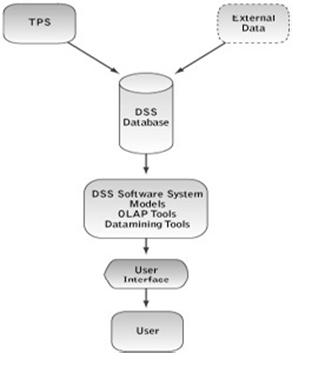
Decision Support Systems (DSS) help executives make better decisions by using historical and current data from internal Information Systems and external sources. By combining massive amounts of data with sophisticated analytical models and tools, and by making the system easy to use, they provide a much better source of information to use in the decision-making process.
Decision Support Systems (DSS) are a class of computerized information systems that support decision-making activities. DSS are interactive computer-based systems and subsystems intended to help decision makers use communications technologies, data, documents, knowledge and/or models to successfully complete decision process tasks.
While many people think of decision support systems as a specialized part of a business, most companies have actually integrated this system into their day to day operating activities. For instance, many companies constantly download and analyze sales data, budget sheets and forecasts and they update their strategy once they analyze and evaluate the current results. Decision support systems have a definite structure in businesses, but in reality, the data and decisions that are based on it are fluid and constantly changing.

Types of Decision Support Systems (DSS)

1.             Data-Driven DSS take the massive amounts of data available through the company’s TPS and MIS systems and cull from it useful information which executives can use to make more informed decisions. They don’t have to have a theory or model but can “free-flow” the data. The first generic type of Decision Support System is a Data-Driven DSS. These systems include file drawer and management reporting systems, data warehousing and analysis systems, Executive Information Systems (EIS) and Spatial Decision Support Systems. Business Intelligence Systems are also examples of Data-Driven DSS. Data-Driven DSS emphasize access to and manipulation of large databases of structured data and especially a time-series of internal company data and sometimes external data. Simple file systems accessed by query and retrieval tools provide the most elementary level of functionality. Data warehouse systems that allow the manipulation of data by computerized tools tailored to a specific task and setting or by more general tools and operators provide additional functionality. Data-Driven DSS with Online Analytical Processing (OLAP) provide the highest level of functionality and decision support that is linked to analysis of large collections of historical data.
2.             Model-Driven DSS A second category, Model-Driven DSS, includes systems that use accounting and financial models, representational models, and optimization models. Model-Driven DSS emphasize access to and manipulation of a model. Simple statistical and analytical tools provide the most elementary level of functionality. Some OLAP systems that allow complex analysis of data may be classified as hybrid DSS systems providing modelling, data retrieval and data summarization functionality. Model-Driven DSS use data and parameters provided by decision-makers to aid them in analyzing a situation, but they are not usually data intensive. Very large databases are usually not needed for Model-Driven DSS. Model-Driven DSS were isolated from the main Information Systems of the organization and were primarily used for the typical “what-if” analysis. That is, “What if we increase production of our products and decrease the shipment time?” These systems rely heavily on models to help executives understand the impact of their decisions on the organization, its suppliers, and its customers.
3.             Knowledge-Driven DSS The terminology for this third generic type of DSS is still evolving. Currently, the best term seems to be Knowledge-Driven DSS. Adding the modifier “driven” to the word knowledge maintains a parallelism in the framework and focuses on the dominant knowledge base component. Knowledge-Driven DSS can suggest or recommend actions to managers. These DSS are personal computer systems with specialized problem-solving expertise. The “expertise” consists of knowledge about a particular domain, understanding of problems within that domain, and “skill” at solving some of these problems. A related concept is Data Mining. It refers to a class of analytical applications that search for hidden patterns in a database. Data mining is the process of sifting through large amounts of data to produce data content relationships.
4.             Document-Driven DSS A new type of DSS, a Document-Driven DSS or Knowledge Management System, is evolving to help managers retrieve and manage unstructured documents and Web pages. A Document-Driven DSS integrates a variety of storage and processing technologies to provide complete document retrieval and analysis. The Web provides access to large document databases including databases of hypertext documents, images, sounds and video. Examples of documents that would be accessed by a Document-Based DSS are policies and procedures, product specifications, catalogs, and corporate historical documents, including minutes of meetings, corporate records, and important correspondence. A search engine is a powerful decision aiding tool associated with a Document-Driven DSS.
5.             Communications-Driven and Group DSS Group Decision Support Systems (GDSS) came first, but now a broader category of Communications-Driven DSS or groupware can be identified. This fifth generic type of Decision Support System includes communication, collaboration and decision support technologies that do not fit within those DSS types identified. Therefore, we need to identify these systems as a specific category of DSS. A Group DSS is a hybrid Decision Support System that emphasizes both the use of communications and decision models. A Group Decision Support System is an interactive computer-based system intended to facilitate the solution of problems by decision-makers working together as a group. Groupware supports electronic communication, scheduling, document sharing, and other group productivity and decision support enhancing activities We have a number of technologies and capabilities in this category in the framework – Group DSS, two-way interactive video, White Boards, Bulletin Boards, and Email.

Components of DSS


Traditionally, academics and MIS staffs have discussed building Decision Support Systems in terms of four major components:
·                     The user interface
·                     The database
·                     The models and analytical tools and
·                     The DSS architecture and network

This traditional list of components remains useful because it identifies similarities and differences between categories or types of DSS. The DSS framework is primarily based on the different emphases placed on DSS components when systems are actually constructed.
Data-Driven, Document-Driven and Knowledge-Driven DSS need specialized database components. A Model- Driven DSS may use a simple flat-file database with fewer than 1,000 records, but the model component is very important. Experience and some empirical evidence indicate that design and implementation issues vary for Data-Driven, Document-Driven, Model-Driven and Knowledge-Driven DSS.
Multi-participant systems like Group and Inter- Organizational DSS also create complex implementation issues. For instance, when implementing a Data-Driven DSS a designer should be especially concerned about the user’s interest in applying the DSS in unanticipated or novel situations. Despite the significant differences created by the specific task and scope of a DSS, all Decision Support Systems have similar technical components and share a common purpose, supporting decision- making.

A Data-Driven DSS database is a collection of current and historical structured data from a number of sources that have been organized for easy access and analysis. We are expanding the data component to include unstructured documents in Document-Driven DSS and “knowledge” in the form of rules or frames in Knowledge-Driven DSS. Supporting management decision-making means that computerized tools are used to make sense of the structured data or documents in a database.
Mathematical and analytical models are the major component of a Model-Driven DSS. Each Model-Driven DSS has a specific set of purposes and hence different models are needed and used. Choosing appropriate models is a key design issue. Also, the software used for creating specific models needs to manage needed data and the user interface. In Model-Driven DSS the values of key variables or parameters are changed, often repeatedly, to reflect potential changes in supply, production, the economy, sales, the marketplace, costs, and/or other environmental and internal factors. Information from the models is then analyzed and evaluated by the decision-maker.
Knowledge-Driven DSS use special models for processing rules or identifying relationships in data. The DSS architecture and networking design component refers to how hardware is organized, how software and data are distributed in the system, and how components of the system are integrated and connected. A major issue today is whether DSS should be available using a Web browser on a company intranet and also available on the Global Internet. Networking is the key driver of Communications- Driven DSS.


Monday, January 26, 2015

BCS/PGD/MIS/SISP

Strategic Information System Planing 
The Ad Doc Approach
This approach towards development of information systems is the worst possible approach as people in the development process are in the process of perpetual fire fighting. There in no plan available and the development work is carried out as per wises of the developer based on his understanding of what the needs of the user should be. The outcome of this kind of approach is a set of systems that are not synchronized or synergized into one system but a host of systems that work in isolation.
The Data Collection Approach
In this approach, all possible data about the need for the system and about the system is collected. This approach assumes that information systems are best developed based on data from all quarters. This results in lack of focus and understanding as the systems development process gets mired unnecessarily into other issues, like projecting the future information requirement in granular detail by the user.
The Organization Chart Approach
In this approach the information system is developed with the organization structure in mind. It assumes that information strictly flows on the basis of organizational structures. Junctions of information exchange are made on an ad hoc basis which complicates the flow of information and brings in redundancy in the system.
Now that we know how not to approach IS development in an organization, let us discuss the appropriate approaches for IS development.
The Top-down Approach
The top-down approach is used to develop IS with the objectives in focus. The objectives of the IS become the most important priority. The objectives are clearly defined in the first step, followed by identification of the activities of the organization. This in turn is followed by the third step in which the decision-making needs of managers within the organization are analyzed and the necessary information flow for facilitating information delivery to managers for decision-making is understood in detail. Once all the details are available, the application is developed. In this type of system the objectives become the mainstay of the system. However, for this kind of system, the requirements from the systems have to be clearly understood upfront to avoid any problems in the development process. This is because the strategy of development is such that the design is not adequately dynamic.

The Bottom-up Approach

In the bottom-up approach, we find out the type of information that is produced in the operational subsystem and then work backward to integrate this with the entire IS structure to have an organization wide impact. In this design, there is more flexibility to change the information system deliverables even during the development process as the individual subsystems are not designed according to the demands of the upper layers as in the case of top-down approach. On the contrary, here the upper layers are integrated with the lower layer subsystems to create the IS. Thus, bottom-up systems can expand in response to real-world changes and needs of the organization.

Monday, January 19, 2015

BCS/DIP/PGD/MIS,CSM,ITSM/PHYSICAL SECURITY

Physical Security
#1: Lock up the server room
Even before you lock down the servers, in fact, before you even turn them on for the first time, you should ensure that there are good locks on the server room door. Of course, the best lock in the world does no good if it isn't used, so you also need policies requiring that those doors be locked any time the room is unoccupied, and the policies should set out who has the key or keycode to get in.
The server room is the heart of your physical network, and someone with physical access to the servers, switches, routers, cables and other devices in that room can do enormous damage.
#2: Set up surveillance
Locking the door to the server room is a good first step, but someone could break in, or someone who has authorized access could misuse that authority. You need a way to know who goes in and out and when. A log book for signing in and out is the most elemental way to accomplish this, but it has a lot of drawbacks. A person with malicious intent is likely to just bypass it.
A better solution than the log book is an authentication system incorporated into the locking devices, so that a smart card, token, or biometric scan is required to unlock the doors, and a record is made of the identity of each person who enters.
A video surveillance camera, placed in a location that makes it difficult to tamper with or disable (or even to find) but gives a good view of persons entering and leaving should supplement the log book or electronic access system. Surveillance cams can monitor continuously, or they can use motion detection technology to record only when someone is moving about. They can even be set up to send e-mail or cell phone notification if motion is detected when it shouldn't be (such as after hours).
#3: Make sure the most vulnerable devices are in that locked room
Remember, it's not just the servers you have to worry about. A hacker can plug a laptop into a hub and use sniffer software to capture data traveling across the network. Make sure that as many of your network devices as possible are in that locked room, or if they need to be in a different area, in a locked closet elsewhere in the building.
#4: Don't forget the workstations
Hackers can use any unsecured computer that's connected to the network to access or delete information that's important to your business. Workstations at unoccupied desks or in empty offices (such as those used by employees who are on vacation or have left the company and not yet been replaced) or at locations easily accessible to outsiders, such as the front receptionist's desk, are particularly vulnerable.
Disconnect and/or remove computers that aren't being used and/or lock the doors of empty offices, including those that are temporarily empty while an employee is at lunch or out sick. Equip computers that must remain in open areas, sometimes out of view of employees, with smart card or biometric readers so that it's more difficult for unauthorized persons to log on.
#5: Protect the portables
Laptops and handheld computers pose special physical security risks. A thief can easily steal the entire computer, including any data stored on its disk as well as network logon passwords that may be saved. If employees use laptops at their desks, they should take them with them when they leave or secure them to a permanent fixture with a cable lock, such as the one at PC Guardian.
Handhelds can be locked in a drawer or safe or just slipped into a pocket and carried on your person when you leave the area. Motion sensing alarms such as the one at SecurityKit.com are also available to alert you if your portable is moved.
For portables that contain sensitive information, full disk encryption, biometric readers, and software that "phones home" if the stolen laptop connects to the Internet can supplement physical precautions.
#6: Pack up the backups
Backing up important data is an essential element in disaster recovery, but don't forget that the information on those backup tapes, disks, or discs can be stolen and used by someone outside the company. Many IT administrators keep the backups next to the server in the server room. They should be locked in a drawer or safe at the very least. Ideally, a set of backups should be kept off site, and you must take care to ensure that they are secured in that offsite location.
Don't overlook the fact that some workers may back up their work on floppy disks, USB keys, or external hard disks. If this practice is allowed or encouraged, be sure to have policies requiring that the backups be locked up at all times.
#7: Disable the drives
If you don't want employees copying company information to removable media, you can disable or remove floppy drives, USB ports, and other means of connecting external drives. Simply disconnecting the cables may not deter technically savvy workers. Some organizations go so far as to fill ports with glue or other substances to permanently prevent their use, although there are software mechanisms that disallow it. Disk locks, such as the one at SecurityKit.com, can be inserted into floppy drives on those computers that still have them to lock out other diskettes.
#8: Protect your printers
You might not think about printers posing a security risk, but many of today's printers store document contents in their own on-board memories. If a hacker steals the printer and accesses that memory, he or she may be able to make copies of recently printed documents. Printers, like servers and workstations that store important information, should be located in secure locations and bolted down so nobody can walk off with them.
Also think about the physical security of documents that workers print out, especially extra copies or copies that don't print perfectly and may be just abandoned at the printer or thrown intact into the trash can where they can be retrieved. It's best to implement a policy of immediately shredding any unwanted printed documents, even those that don't contain confidential information. This establishes a habit and frees the end user of the responsibility for determining whether a document should be shredded.


Tuesday, October 7, 2014

BCS TIME TABLE (MORNING) - FOR APRIL 2015

Date
Subject(PGD)
27th Monday   9.00 a.m. – 10.30 a.m.
CSM
27th Monday   10.30 a.m. – 12.00 noon
MIS
28th Tuesday   9.00 a.m. – 10.30 a.m.
KBS
28th Tuesday   10.30 a.m. – 12.00 noon
RUID
28th Tuesday   1.30 p.m. – 3.30 p.m.
SE2
Date
Subject(Diploma)
29th Wednesday  9.00 a.m. – 10.30 a.m.
CORE
29th Wednesday  10.30 a.m. – 12.00 noon
ITPM
30th Thursday       9.00 a.m. – 10.30 a.m.
ITSM
30th Thursday       10.30 a.m. – 12.00 noon
PIT

BCS Class( EVENING) Time table for April 2015

Date
Subject(Diploma)
27th Monday    6.00 p.m. – 7.30 p.m.
CORE
27th Monday    7.30 p.m. – 9.00 p.m.
ITSM
28th Tuesday    6.00 p.m. – 7.30 p.m.
ITPM
28th Tuesday    7.30 p.m. - 9.00 p.m.
PIT
Date
Subject(PGD)
29th Wednesday  6.00  p.m. – 7.30 p.m.
CSM
29th Wednesday  7.30  p.m. – 9.00 p.m.
MIS
30th Thursday       6.00  p.m.- 7.30  p.m.
KBS
30th Thursday       7.30  p.m. – 9.00 p.m.
SE2


Monday, September 22, 2014

BCS/PGD/ITE/ REMOTE SENSING

  • LIDAR

LIDAR, which stands for Light Detection and Ranging, is a remote sensing method that uses light in the form of a pulsed laser to measure ranges (variable distances) to the Earth. These light pulses—combined with other data recorded by the airborne system— generate precise, three-dimensional information about the shape of the Earth and its surface characteristics.
A LIDAR instrument principally consists of a laser, a scanner, and a specialized GPS receiver. Airplanes and helicopters are the most commonly used platforms for acquiring LIDAR data over broad areas.
LIDAR systems allow scientists and mapping professionals to examine both natural and manmade environments with accuracy, precision, and flexibility. NOAA scientists are using LIDAR to produce more accurate shoreline maps, make digital elevation models for use in geographic information systems, to assist in emergency response operations, and in many other applications.

Extra Reading 

LIDAR (Light Detection and Ranging) is an optical remote sensing technology that measures properties of scattered light to find range and/or other information of a distant target.

LIDAR data is often collected by air, such as with this NOAA (National Oceanic and Atmospheric Administration) survey aircraft (top) over Bixby Bridge in Big Sur, Calif. Here, LIDAR data reveals a top-down (bottom left) and profile view of Bixby Bridge. NOAA scientists use LIDAR-generated products to examine both natural and manmade environments. LIDAR data supports activities such as inundation and storm surge modeling, hydrodynamic modeling, shoreline mapping, emergency response, hydrographical surveying, and coastal vulnerability analysis.

Radiometry & Photometry

An overview of the science of measuring light

Radiometry is the science of measuring light in any portion of the electromagnetic spectrum. In practice, the term is usually limited to the measurement of infrared, visible, and ultraviolet light using optical instruments. Irradiance is the intensity of light and is measured in watts per square meter.

Photometry is the science of measuring visible light in units that are weighted according to the sensitivity of the human eye. It is a quantitative science based on a statistical model of the human visual response to light - that is, our perception of light - under carefully controlled conditions. The photometric equivalent of Radiance is called Illuminance and is measured in Lumens per square meter (Lux)The human visual system responds to the light in the electromagnetic spectrum with wavelengths ranging from 380 to 770 nanometers (nm). We see light of different wavelengths as a continuum of colors ranging through the visible spectrum: 650 nm is red, 540 nm is green, 450 nm is blue, and so on.

Photographic interpretation is “the act of examining photographic images for the purpose of identifying objects and judging their significance” (Colwell, 1997). This mainly refers to its usage in military aerial reconnaissance using photographs taken from reconnaissance aircraft..

Thermal imaging is a method of improving visibility of objects in a dark environment by detecting the objects' infrared radiation and creating an image based on that information. 
Thermal imaging, near-infrared illumination, low-light imaging and are the three most commonly used night vision technologies. Unlike the other two methods, thermal imaging works in environments without any ambient light. Like near-infrared illumination, thermal imaging can penetrate obscurantist such as smoke, fog and haze.
Extra reading 
Here's a brief explanation of how thermal imaging works: All objects emit infrared energy (heat) as a function of their temperature. The infrared energy emitted by an object is known as its heat signature. In general, the hotter an object is, the more radiation it emits. A thermal imager (also known as a thermal camera) is essentially a heat sensor that is capable of detecting tiny differences in temperature. The device collects the infrared radiation from objects in the scene and creates an electronic image based on information about the temperature differences. Because objects are rarely precisely the same temperature as other objects around them, a thermal camera can detect them and they will appear as distinct in a thermal image.