Showing posts with label DIPLOMA. Show all posts

Monday, March 16, 2015

BCS/DIP/ITPM/ Role and Responsibility of project team

Project Roles and Responsibilities

There are many groups of people involved in both the project and project management lifecycles.
The Project Team is the group responsible for planning and executing the project. It consists of a Project Manager and a variable number of Project Team members, who are brought in to deliver their tasks according to the project schedule.
·         The Project Manager is the person responsible for ensuring that the Project Team completes the project. The Project Manager develops the Project Plan with the team and manages the team’s performance of project tasks. It is also the responsibility of the Project Manager to secure acceptance and approval of deliverables from the Project Sponsor and Stakeholders. The Project Manager is responsible for communication, including status reporting, risk management, escalation of issues that cannot be resolved in the team, and, in general, making sure the project is delivered in budget, on schedule, and within scope.

·         The Project Team Members are responsible for executing tasks and producing deliverables as outlined in the Project Plan and directed by the Project Manager, at whatever level of effort or participation has been defined for them.

·         On larger projects, some Project Team members may serve as Team Leads, providing task and technical leadership, and sometimes maintaining a portion of the project plan.


The Executive Sponsor is a manager with demonstrable interest in the outcome of the project who is ultimately responsible for securing spending authority and resources for the project. Ideally, the Executive Sponsor should be the highest-ranking manager possible, in proportion to the project size and scope. The Executive Sponsor acts as a vocal and visible champion, legitimizes the project’s goals and objectives, keeps abreast of major project activities, and is the ultimate decision-maker for the project. The Executive Sponsor provides support for the Project Sponsor and/or Project Director and Project Manager and has final approval of all scope changes, and signs off on approvals to proceed to each succeeding project phase. The Executive Sponsor may elect to delegate some of the above responsibilities to the Project Sponsor and/or Project Director.
The Project Sponsor and/or Project Director is a manager with demonstrable interest in the outcome of the project who is responsible for securing spending authority and resources for the project. The Project Sponsor acts as a vocal and visible champion, legitimizes the project’s goals and objectives, keeps abreast of major project activities, and is a decision-maker for the project. The Project Sponsor will participate in and/or lead project initiation; the development of the Project Charter. He or she will participate in project planning (high level) and the development of the Project Initiation Plan. The Project Sponsor provides support for the Project Manager; assists with major issues, problems, and policy conflicts; removes obstacles; is active in planning the scope; approves scope changes; signs off on major deliverables; and signs off on approvals to proceed to each succeeding project phase. The Project Sponsor generally chairs the steering committee on large projects. The Project Sponsor may elect to delegate any of the above responsibilities to other personnel either on or outside the Project Team
The Steering Committee generally includes management representatives from the key organizations involved in the project oversight and control, and any other key stakeholder groups that have special interest in the outcome of the project. The Steering committee acts individually and collectively as a vocal and visible project champion throughout their representative organizations; generally they approve project deliverables, help resolve issues and policy decisions, approve scope changes, and provide direction and guidance to the project. Depending on how the project is organized, the steering committee can be involved in providing resources, assist in securing funding, act as liaisons to executive groups and sponsors, and fill other roles as defined by the project.
Customers comprise the business units that identified the need for the product or service the project will develop. Customers can be at all levels of an organization. Since it is frequently not feasible for all the Customers to be directly involved in the project, the following roles are identified:
·         Customer Representatives are members of the Customer community who are identified and made available to the project for their subject matter expertise. Their responsibility is to accurately represent their business units’ needs to the Project Team, and to validate the deliverables that describe the product or service that the project will produce. Customer Representatives are also expected to bring information about the project back to the Customer community. Towards the end of the project, Customer Representatives will test the product or service the project is developing, using and evaluating it while providing feedback to the Project Team.
·         Customer Decision-Makers are those members of the Customer community who have been designated to make project decisions on behalf of major business units that will use, or will be affected by, the product or service the project will deliver. Customer Decision-Makers are responsible for achieving consensus of their business unit on project issues and outputs, and communicating it to the Project Manager. They attend project meetings as requested by the Project Manager, review and approve process deliverables, and provide subject matter expertise to the Project Team. On some projects they may also serve as Customer Representatives or be part of the Steering Committee.
Stakeholders are all those groups, units, individuals, or organizations, internal or external to our organization, which are impacted by, or can impact, the outcomes of the project. This includes the Project Team, Sponsors, Steering Committee, Customers, and Customer co-workers who will be affected by the change in Customer work practices due to the new product or service; Customer managers affected by modified workflows or logistics; Customer correspondents affected by the quantity or quality of newly available information; and other similarly affected groups.
Key Stakeholders are a subset of Stakeholders who, if their support were to be withdrawn, would cause the project to fail.

Vendors are contracted to provide additional products or services the project will require and are another member of the Project Team.

Wednesday, February 25, 2015

PGD/ MIS/DIP/ITSM/ Decision Support Systems (DSS)


Decision Support Systems (DSS)


Decision Support Systems (DSS) help executives make better decisions by using historical and current data from internal Information Systems and external sources. By combining massive amounts of data with sophisticated analytical models and tools, and by making the system easy to use, they provide a much better source of information to use in the decision-making process.
Decision Support Systems (DSS) are a class of computerized information systems that support decision-making activities. DSS are interactive computer-based systems and subsystems intended to help decision makers use communications technologies, data, documents, knowledge and/or models to successfully complete decision process tasks.
While many people think of decision support systems as a specialized part of a business, most companies have actually integrated this system into their day to day operating activities. For instance, many companies constantly download and analyze sales data, budget sheets and forecasts and they update their strategy once they analyze and evaluate the current results. Decision support systems have a definite structure in businesses, but in reality, the data and decisions that are based on it are fluid and constantly changing.

Types of Decision Support Systems (DSS)

1.             Data-Driven DSS take the massive amounts of data available through the company’s TPS and MIS systems and cull from it useful information which executives can use to make more informed decisions. They don’t have to have a theory or model but can “free-flow” the data. The first generic type of Decision Support System is a Data-Driven DSS. These systems include file drawer and management reporting systems, data warehousing and analysis systems, Executive Information Systems (EIS) and Spatial Decision Support Systems. Business Intelligence Systems are also examples of Data-Driven DSS. Data-Driven DSS emphasize access to and manipulation of large databases of structured data and especially a time-series of internal company data and sometimes external data. Simple file systems accessed by query and retrieval tools provide the most elementary level of functionality. Data warehouse systems that allow the manipulation of data by computerized tools tailored to a specific task and setting or by more general tools and operators provide additional functionality. Data-Driven DSS with Online Analytical Processing (OLAP) provide the highest level of functionality and decision support that is linked to analysis of large collections of historical data.
2.             Model-Driven DSS A second category, Model-Driven DSS, includes systems that use accounting and financial models, representational models, and optimization models. Model-Driven DSS emphasize access to and manipulation of a model. Simple statistical and analytical tools provide the most elementary level of functionality. Some OLAP systems that allow complex analysis of data may be classified as hybrid DSS systems providing modelling, data retrieval and data summarization functionality. Model-Driven DSS use data and parameters provided by decision-makers to aid them in analyzing a situation, but they are not usually data intensive. Very large databases are usually not needed for Model-Driven DSS. Model-Driven DSS were isolated from the main Information Systems of the organization and were primarily used for the typical “what-if” analysis. That is, “What if we increase production of our products and decrease the shipment time?” These systems rely heavily on models to help executives understand the impact of their decisions on the organization, its suppliers, and its customers.
3.             Knowledge-Driven DSS The terminology for this third generic type of DSS is still evolving. Currently, the best term seems to be Knowledge-Driven DSS. Adding the modifier “driven” to the word knowledge maintains a parallelism in the framework and focuses on the dominant knowledge base component. Knowledge-Driven DSS can suggest or recommend actions to managers. These DSS are personal computer systems with specialized problem-solving expertise. The “expertise” consists of knowledge about a particular domain, understanding of problems within that domain, and “skill” at solving some of these problems. A related concept is Data Mining. It refers to a class of analytical applications that search for hidden patterns in a database. Data mining is the process of sifting through large amounts of data to produce data content relationships.
4.             Document-Driven DSS A new type of DSS, a Document-Driven DSS or Knowledge Management System, is evolving to help managers retrieve and manage unstructured documents and Web pages. A Document-Driven DSS integrates a variety of storage and processing technologies to provide complete document retrieval and analysis. The Web provides access to large document databases including databases of hypertext documents, images, sounds and video. Examples of documents that would be accessed by a Document-Based DSS are policies and procedures, product specifications, catalogs, and corporate historical documents, including minutes of meetings, corporate records, and important correspondence. A search engine is a powerful decision aiding tool associated with a Document-Driven DSS.
5.             Communications-Driven and Group DSS Group Decision Support Systems (GDSS) came first, but now a broader category of Communications-Driven DSS or groupware can be identified. This fifth generic type of Decision Support System includes communication, collaboration and decision support technologies that do not fit within those DSS types identified. Therefore, we need to identify these systems as a specific category of DSS. A Group DSS is a hybrid Decision Support System that emphasizes both the use of communications and decision models. A Group Decision Support System is an interactive computer-based system intended to facilitate the solution of problems by decision-makers working together as a group. Groupware supports electronic communication, scheduling, document sharing, and other group productivity and decision support enhancing activities We have a number of technologies and capabilities in this category in the framework – Group DSS, two-way interactive video, White Boards, Bulletin Boards, and Email.

Components of DSS


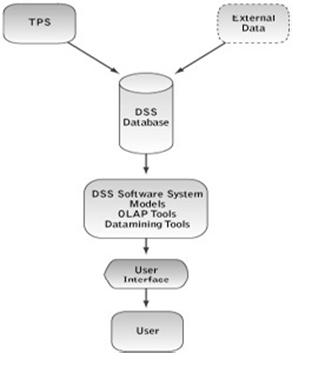
Traditionally, academics and MIS staffs have discussed building Decision Support Systems in terms of four major components:
·                     The user interface
·                     The database
·                     The models and analytical tools and
·                     The DSS architecture and network

This traditional list of components remains useful because it identifies similarities and differences between categories or types of DSS. The DSS framework is primarily based on the different emphases placed on DSS components when systems are actually constructed.
Data-Driven, Document-Driven and Knowledge-Driven DSS need specialized database components. A Model- Driven DSS may use a simple flat-file database with fewer than 1,000 records, but the model component is very important. Experience and some empirical evidence indicate that design and implementation issues vary for Data-Driven, Document-Driven, Model-Driven and Knowledge-Driven DSS.
Multi-participant systems like Group and Inter- Organizational DSS also create complex implementation issues. For instance, when implementing a Data-Driven DSS a designer should be especially concerned about the user’s interest in applying the DSS in unanticipated or novel situations. Despite the significant differences created by the specific task and scope of a DSS, all Decision Support Systems have similar technical components and share a common purpose, supporting decision- making.

A Data-Driven DSS database is a collection of current and historical structured data from a number of sources that have been organized for easy access and analysis. We are expanding the data component to include unstructured documents in Document-Driven DSS and “knowledge” in the form of rules or frames in Knowledge-Driven DSS. Supporting management decision-making means that computerized tools are used to make sense of the structured data or documents in a database.
Mathematical and analytical models are the major component of a Model-Driven DSS. Each Model-Driven DSS has a specific set of purposes and hence different models are needed and used. Choosing appropriate models is a key design issue. Also, the software used for creating specific models needs to manage needed data and the user interface. In Model-Driven DSS the values of key variables or parameters are changed, often repeatedly, to reflect potential changes in supply, production, the economy, sales, the marketplace, costs, and/or other environmental and internal factors. Information from the models is then analyzed and evaluated by the decision-maker.
Knowledge-Driven DSS use special models for processing rules or identifying relationships in data. The DSS architecture and networking design component refers to how hardware is organized, how software and data are distributed in the system, and how components of the system are integrated and connected. A major issue today is whether DSS should be available using a Web browser on a company intranet and also available on the Global Internet. Networking is the key driver of Communications- Driven DSS.


Monday, January 19, 2015

BCS/DIP/PGD/MIS,CSM,ITSM/PHYSICAL SECURITY

Physical Security
#1: Lock up the server room
Even before you lock down the servers, in fact, before you even turn them on for the first time, you should ensure that there are good locks on the server room door. Of course, the best lock in the world does no good if it isn't used, so you also need policies requiring that those doors be locked any time the room is unoccupied, and the policies should set out who has the key or keycode to get in.
The server room is the heart of your physical network, and someone with physical access to the servers, switches, routers, cables and other devices in that room can do enormous damage.
#2: Set up surveillance
Locking the door to the server room is a good first step, but someone could break in, or someone who has authorized access could misuse that authority. You need a way to know who goes in and out and when. A log book for signing in and out is the most elemental way to accomplish this, but it has a lot of drawbacks. A person with malicious intent is likely to just bypass it.
A better solution than the log book is an authentication system incorporated into the locking devices, so that a smart card, token, or biometric scan is required to unlock the doors, and a record is made of the identity of each person who enters.
A video surveillance camera, placed in a location that makes it difficult to tamper with or disable (or even to find) but gives a good view of persons entering and leaving should supplement the log book or electronic access system. Surveillance cams can monitor continuously, or they can use motion detection technology to record only when someone is moving about. They can even be set up to send e-mail or cell phone notification if motion is detected when it shouldn't be (such as after hours).
#3: Make sure the most vulnerable devices are in that locked room
Remember, it's not just the servers you have to worry about. A hacker can plug a laptop into a hub and use sniffer software to capture data traveling across the network. Make sure that as many of your network devices as possible are in that locked room, or if they need to be in a different area, in a locked closet elsewhere in the building.
#4: Don't forget the workstations
Hackers can use any unsecured computer that's connected to the network to access or delete information that's important to your business. Workstations at unoccupied desks or in empty offices (such as those used by employees who are on vacation or have left the company and not yet been replaced) or at locations easily accessible to outsiders, such as the front receptionist's desk, are particularly vulnerable.
Disconnect and/or remove computers that aren't being used and/or lock the doors of empty offices, including those that are temporarily empty while an employee is at lunch or out sick. Equip computers that must remain in open areas, sometimes out of view of employees, with smart card or biometric readers so that it's more difficult for unauthorized persons to log on.
#5: Protect the portables
Laptops and handheld computers pose special physical security risks. A thief can easily steal the entire computer, including any data stored on its disk as well as network logon passwords that may be saved. If employees use laptops at their desks, they should take them with them when they leave or secure them to a permanent fixture with a cable lock, such as the one at PC Guardian.
Handhelds can be locked in a drawer or safe or just slipped into a pocket and carried on your person when you leave the area. Motion sensing alarms such as the one at SecurityKit.com are also available to alert you if your portable is moved.
For portables that contain sensitive information, full disk encryption, biometric readers, and software that "phones home" if the stolen laptop connects to the Internet can supplement physical precautions.
#6: Pack up the backups
Backing up important data is an essential element in disaster recovery, but don't forget that the information on those backup tapes, disks, or discs can be stolen and used by someone outside the company. Many IT administrators keep the backups next to the server in the server room. They should be locked in a drawer or safe at the very least. Ideally, a set of backups should be kept off site, and you must take care to ensure that they are secured in that offsite location.
Don't overlook the fact that some workers may back up their work on floppy disks, USB keys, or external hard disks. If this practice is allowed or encouraged, be sure to have policies requiring that the backups be locked up at all times.
#7: Disable the drives
If you don't want employees copying company information to removable media, you can disable or remove floppy drives, USB ports, and other means of connecting external drives. Simply disconnecting the cables may not deter technically savvy workers. Some organizations go so far as to fill ports with glue or other substances to permanently prevent their use, although there are software mechanisms that disallow it. Disk locks, such as the one at SecurityKit.com, can be inserted into floppy drives on those computers that still have them to lock out other diskettes.
#8: Protect your printers
You might not think about printers posing a security risk, but many of today's printers store document contents in their own on-board memories. If a hacker steals the printer and accesses that memory, he or she may be able to make copies of recently printed documents. Printers, like servers and workstations that store important information, should be located in secure locations and bolted down so nobody can walk off with them.
Also think about the physical security of documents that workers print out, especially extra copies or copies that don't print perfectly and may be just abandoned at the printer or thrown intact into the trash can where they can be retrieved. It's best to implement a policy of immediately shredding any unwanted printed documents, even those that don't contain confidential information. This establishes a habit and frees the end user of the responsibility for determining whether a document should be shredded.


Thursday, August 28, 2014

BCS/DIP/ITPM/TUTORIAL 01

DEFINITION
A Project is a temporary endeavor undertaken to create a unique product, service or a result.

Project Management is about applying our knowledge, skills, tools and techniques to project activities to meet project requirements.

1.)    List and explain very briefly the four main criteria for assessing the success of a project.

Ø   
Ø   
Ø   
Ø   
2.)    For each of these factors above, describe at least TWO potential problems that might arise to jeopardize the eventual success of the project.


3.)    What is the purpose of a business Case ?


4.)    Describe the main sections to be found in a business case report.
a.        
b.       
c.        
d.       
e.       
f.         
5.)    Identify FOUR events which might lead to an updating of the business case.


6.)    What are the main project management Processes?
a.       Initiating Process: authorizing the project or phase
b.       Planning Process: define and verify requirements, objectives, goals and the way forward.
c.        Executing Process: coordinating people and other resources to carry out the plan
d.      Monitoring and  Controlling Process: measuring and monitoring progress regularly
e.       Closing Process: formalizing the completion of project

7.)    Define the word project Stakeholders?
Project stakeholders are individuals and organizations that are actively involved in the project, or whose interests may be affected as a result of project execution or completion.
Ø  Project Manager
Ø   Project Sponsor
Ø   Project team members
Ø   Project Steering committee
Ø  Customers
8.)    Identify the role and responsibility of each and every stakeholder in the above.


9.)    Nine knowledge Areas of Project Management.


10.)  Explain the project Development Life Cycle.


11.) Explain the advantages and disadvantages of In-house development, outsourcing and cloud-computing.

In-house development


Outsourcing


Cloud computing


Off-the-shelf packages


 Question A1
The Tyre-It Company sells and fits tyres from a number of different manufacturers to a wide variety of motor vehicles. This is a very competitive market and it is important that the company always has a ready stock of the most popular car tyre brands. It must also be able to answer immediately any telephone enquiry for the price and number of tyres of a specific type available at that time.
In addition, good management information and the strict control of costs are essential in order for the organisation to maintain its competitive position.
It has become clear that the existing computer-based stock system, which was developed by the in-house IT section, is no longer adequate and a decision has been made by the Tyre-It senior management to adopt a new more advanced stock recording and enquiry system.
Some major tyre manufacturers offer such systems as on off-the-shelf (OTS) package, but the Tyre-It management are concerned that such packages might be too restrictive and thus not suitable for the wide range of tyres that it sells. The alternative would be to design and develop a new in-house system. However, the IT section has no experience of on-line or cost-based systems.
                         
Write a memorandum to the Tyre-It management setting out the advantages and disadvantages of acquiring an ‘off-the-shelf’ system as opposed to developing a new application in-house using its own staff, bearing in mind the scenario outlines above

(15 marks)
                         
A decision has been made to acquire an off-the-shelf package. Describe the activities that would now be needed to select and acquire the software and to set up a fully operational stock system.

(10 marks)


 Question A3
a) Explain the main reasons for using:

i) change control and
ii) configuration management

when developing a new in-house computer system. Highlight at least TWO advantages and ONE disadvantage of each.
(12 marks)
b) List and explain briefly FIVE major stages in the change control process.
(7 marks)
c) List and explain briefly the THREE major elements of a configuration management system. (6 marks)


2011 –Sep
a) Costs and benefits are two essential sections within a business case. List FIVE other sections in a business case.(5 marks)

b) List FIVE categories or types of benefits that are associated with an IT project and provide an example for each one.(10 marks)

c) List FIVE estimating techniques that can be used to identify costs.(5 marks)

d) There are some projects that will be given approval even though the costs exceed the benefits in the business case. Describe ONE example of when this might be legitimate.(4 marks)

Question 1
a) Explain what is meant by a successful project, giving the four main criteria of success. (4 marks)

b) Identify and describe SIX of the major types of activity that would be carried out in a software development project, highlighting those in which the eventual users should be involved and explaining how.  (6 marks)

c) A large distribution company wishes to implement a new warehouse system, and is undecided whether to develop the system internally (i.e. an “in-house system”) or to acquire and adapt an “off-the-shelf” (OTS) package for this purpose.

For EACH of the six types of activity listed in part b, compare the work to be undertaken for each of these two possible methods of system development, highlighting the key differences.                 (12 marks)


d) Identify one significant risk specific to the “in-house” approach and one risk specific to the “OTS” approach. (3 marks)

BCS / DIP / PGD/ CORE /CSM / COMPUTER MISUSE ACT 1990

The Computer Misuse Act (1990)

Hacking has been around almost as long as the Internet; some people just love to try and break into a computer system.
The Computer Misuse Act of 1990 is a law in the United Kingdom that makes certain activities illegal, such as hacking into other people’s systems, misusing software, or helping a person to gain access to protected files of someone else's computer. So, in 1990, the Computer Misuse Act was passed.
The Computer Misuse Act (1990) recognised the following new offences:
  1. Unauthorised access to computer material
The first section in the act forbids a person to use someone else’s identification to access a computer, run a program, or obtain any data, even if no personal gain is involved in such access. Individuals also cannot change, copy, delete, or move a program. The Computer Misuse Act also outlaws any attempts to obtain someone else’s password. Obviously, if someone gives another person his identification and he may legally use the computer, these laws under unauthorized access do not apply.
  1. Unauthorised access with intent to commit or facilitate a crime
The second provision in the law is gaining access to a computer system in order to commit or facilitate a crime. An individual can’t use someone else’s system to send material that might be offensive or to start worms or viruses. He also can’t give someone his identification so that he can use a system for this purpose. This second part means that the individual would be facilitating someone else’s intent or crime.
  1. Unauthorised modification of computer material.
Unauthorized modification in the Computer Misuse Act means that a person can’t delete, change, or corrupt data. Again, if someone puts a virus into someone else’s system, he would be violating the act. Usually, committing unauthorized access only is thought a crime punishable by fine. Access with intent and unauthorized modification are considered more severe and may be punished by heavy fines and/or jail time.

3a. Making, supplying or obtaining anything which can be used in computer misuse offences.

Making: This includes the writing or creation of computer viruses, worms, trojans, malware, malicious scripts etc.
Supplying: This part covers the distribution of any of the above material whether you have created it yourself or obtained it from elsewhere. It is an offense to supply or distribute these files to others.
Obtaining: If you purposely obtain malicious files such as computer viruses or scripts that you know could be used to damage computer systems then you have committed an offence under the Computer Misuse Act.


Wednesday, August 27, 2014

BCS/DIP/CER/PGD/ BCS CODE OF CONDUCT SUMMARY

BCS Code of Conduct

 As a professional body the British Computer Society (known as BCS, the Chartered Institute for IT), has a responsibility to set rules and professional standards to direct the behaviour of its members in professional matters. It is expected that these rules and professional standards will be higher than those established by the general law and that they will be enforced through disciplinary action which can result in expulsion from membership.
Members are expected to exercise their own judgement (which should be made in such a way as to be reasonably justified) to meet the requirements of the code and seek advice if in doubt.


  • ·         sets out the professional standards required by BCS as a condition of membership.
  •  ·         applies to all members, irrespective of their membership grade, the role they fulfil, or the jurisdiction where they are employed or discharge their contractual obligations.
  •  ·         governs the conduct of the individual, not the nature of the business or ethics of any Relevant Authority*.

1. Public Interest

You shall:
a. have due regard for public health, privacy, security and wellbeing of others and the environment.
b. have due regard for the legitimate rights of Third Parties*.
c. conduct your professional activities without discrimination on the grounds of sex, sexual orientation, marital status, nationality, colour, race, ethnic origin, religion, age or disability, or of any other condition or requirement
d. promote equal access to the benefits of IT and seek to promote the inclusion of all sectors in society wherever opportunities arise.

2. Professional Competence and Integrity

You shall:
a. only undertake to do work or provide a service that is within your professional competence.
b. NOT claim any level of competence that you do not possess.
c. develop your professional knowledge, skills and competence on a continuing basis, maintaining awareness of technological developments, procedures, and standards that are relevant to your field.
d. ensure that you have the knowledge and understanding of Legislation* and that you comply with such Legislation, in carrying out your professional responsibilities.
e. respect and value alternative viewpoints and, seek, accept and offer honest criticisms of work.
f. avoid injuring others, their property, reputation, or employment by false or malicious or negligent action or inaction.
g. reject and will not make any offer of bribery or unethical inducement.

3. Duty to Relevant Authority

You shall:
a. carry out your professional responsibilities with due care and diligence in accordance with the Relevant Authority’s requirements whilst exercising your professional judgement at all times.
b. seek to avoid any situation that may give rise to a conflict of interest between you and your Relevant Authority.
c. accept professional responsibility for your work and for the work of colleagues who are defined in a given context as working under your supervision.
d. NOT disclose or authorise to be disclosed, or use for personal gain or to benefit a third party, confidential information except with the permission of your Relevant Authority, or as required by Legislation.
e. NOT misrepresent or withhold information on the performance of products, systems or services (unless lawfully bound by a duty of confidentiality not to disclose such information), or take advantage of the lack of relevant knowledge or inexperience of others.

4. Duty to the Profession

You shall:
a. accept your personal duty to uphold the reputation of the profession and not take any action which could bring the profession into disrepute.
b. seek to improve professional standards through participation in their development, use and enforcement.
c. uphold the reputation and good standing of BCS, the Chartered Institute for IT.
d. act with integrity and respect in your professional relationships with all members of BCS and with members of other professions with whom you work in a professional capacity.
e. notify BCS if convicted of a criminal offence or upon becoming bankrupt or disqualified as a Company Director and in each case give details of the relevant jurisdiction.
f. encourage and support fellow members in their professional development.